Drop an image here
or click to choose
JPG, PNG, WebP
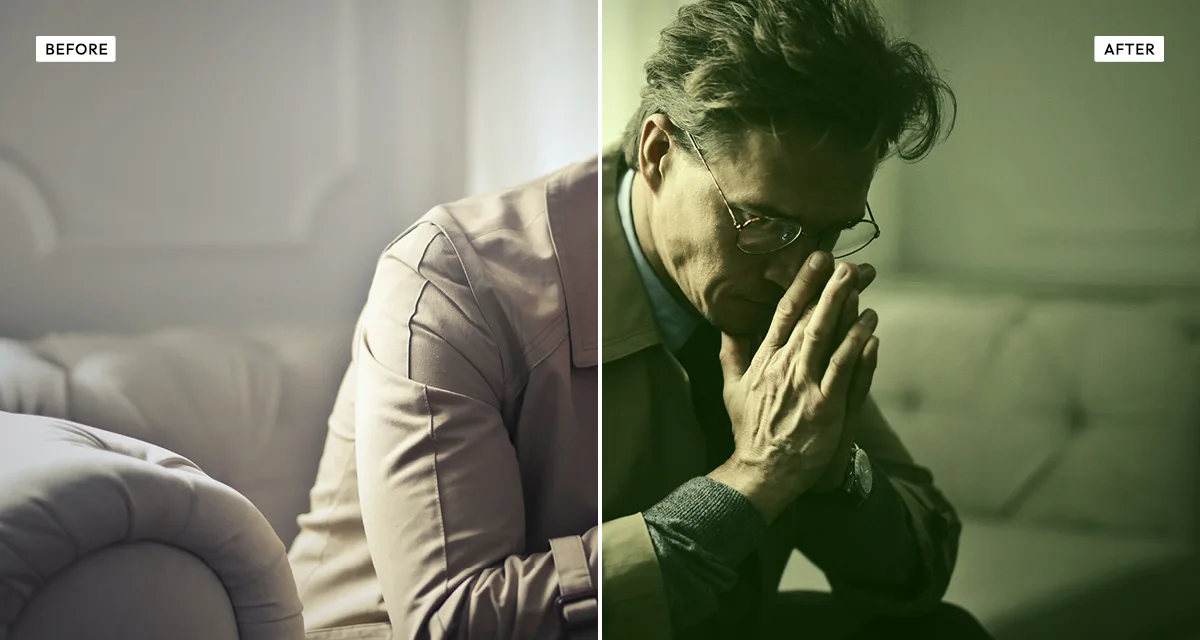
About the Cinematic Verde Effect
Last updated 21 August 2026
How the effect works
The Matrix graded its scenes inside the simulation green and everything in the real world blue, so an audience could tell instantly which was which without being told. That decision made green shorthand for "this is a constructed reality" for a generation of film-makers, and the look spread through science fiction, hacker thrillers and video-game cinematics.
It works because green is what artificial light looks like when it goes wrong. Fluorescent tubes and old monitors spike green, and film stock balanced for daylight renders them sickly. The eye reads a green cast as institutional, indoor and slightly unwell — which is why it suits offices, corridors and server rooms and rarely suits landscapes.
The grade separates by tonal range rather than applying one tint flat. Verde strength drives green into the midtones, shadow lift raises the blacks so the tint stays visible in the dark areas instead of disappearing, and highlight warmth holds the bright end warm — that opposition between cool mids and warm highs is what makes it read as a deliberate grade rather than a filter.
What each control does
| Control | Range | Default | What it changes |
|---|---|---|---|
| Verde strength | 0–100 | 85 | How much green is pushed into the midtones. The core of the effect. |
| Shadow lift | 0–100 | 60 | Raises the black point so the green stays visible in shadows rather than going to black. |
| Highlight warmth | 0–100 | 48 | Keeps the bright end warm. The contrast against the green mids is what sells the grade. |
| Saturation | −100 to +100 | −15 | Slightly negative: a graded film frame is less saturated than a phone photo. |
| Contrast | −100 to +100 | 30 | Overall contrast, applied after the grade. |
| Shadow crush | 0–100 | 35 | Pushes the darkest areas back down, balancing the shadow lift above. |
| Grain | 0–100 | 20 | Film grain. A small amount stops a heavy grade looking digitally flat. |
| Vignette | 0–100 | 35 | Edge darkening. Higher than most effects here, as cinematic framing usually carries one. |
Tips
- Interiors, corridors, offices and night streets take this grade well. Landscapes and skin-heavy portraits usually do not — green skin reads as illness rather than style.
- Do not lower highlight warmth to zero. Green everywhere flattens into a monochrome tint; the warm highlights are what make it a grade.
- Use shadow lift and shadow crush together. Lift makes the tint visible in the dark areas, crush stops the image going milky.
- Start on the signature preset. Bold is deliberately overdone and is easier to pull back from than to build up to.
Common uses
Science-fiction and thriller poster art, film stills and previsualisation, game and streaming artwork, band photography, tech and cybersecurity editorial, album covers, and social posts that need an uneasy, artificial feel.
Frequently asked questions
What is the cinematic verde effect?
The cinematic verde effect is a green colour grade modelled on science-fiction and thriller cinema, most famously The Matrix. It pushes green through the midtones and shadows while keeping highlights warm, so the image reads as artificial light rather than daylight.
How do I make a photo look like a sci-fi film?
Grade the midtones green while keeping the highlights warm. That opposition is what reads as a deliberate film grade rather than a colour filter — green applied flat across everything just looks tinted. Add a vignette and a little grain, since cinematic framing usually carries both.
How do I add a green tint to a photo without it looking sickly?
Hold the highlights warm and lift the shadows before pushing green into the midtones. Green everywhere flattens into a monochrome wash and makes skin look ill. Interiors, corridors and night streets take this grade well; skin-heavy portraits and landscapes generally do not.
Is the cinematic verde effect free to use?
Yes. The cinematic verde effect is free, and you can adjust every setting and preview the result without signing up. Credits are only needed to download at full original resolution; the preview and standard-resolution download cost nothing.
Do I need to upload my photo?
No. The cinematic verde effect runs entirely in your browser, so your original photo is processed on your own device and never leaves it. If you are signed in and save a full-resolution download, the rendered result — not your original — is stored in your private account folder, encrypted with AES-256, and deleted automatically after 30 days.
How do I get the green Matrix look on a photo?
Drop the photo in and use the signature preset, then raise verde strength toward 90 and keep highlight warmth near 50. The warm highlights against green midtones are what make it read as a deliberate film grade; green applied flat across the whole image just looks like a colour filter.
Why do so many films use a green colour grade?
The Matrix graded scenes inside the simulation green and the real world blue, so viewers could tell them apart instantly. It stuck because green is what artificial light looks like when it goes wrong — fluorescent tubes and old monitors spike green — so the eye reads it as institutional, indoor and slightly unwell.
Can I use the cinematic verde effect on client or commercial work?
Yes. Images you create with the cinematic verde effect can be used for personal and commercial projects, including client work, packaging and merchandise. Full terms are on the licence page.
Related effects
For a colder night-time grade, see Day to Night. Old Bleach gives the harsh desaturated film-lab look, Dramatic Black and White removes colour entirely, and Duotone maps the image onto two colours of your choosing.