Drop an image hereor click to chooseJPG, PNG, WebP
About the Duo Halftone Effect
Last updated 21 August 2026
How the effect works
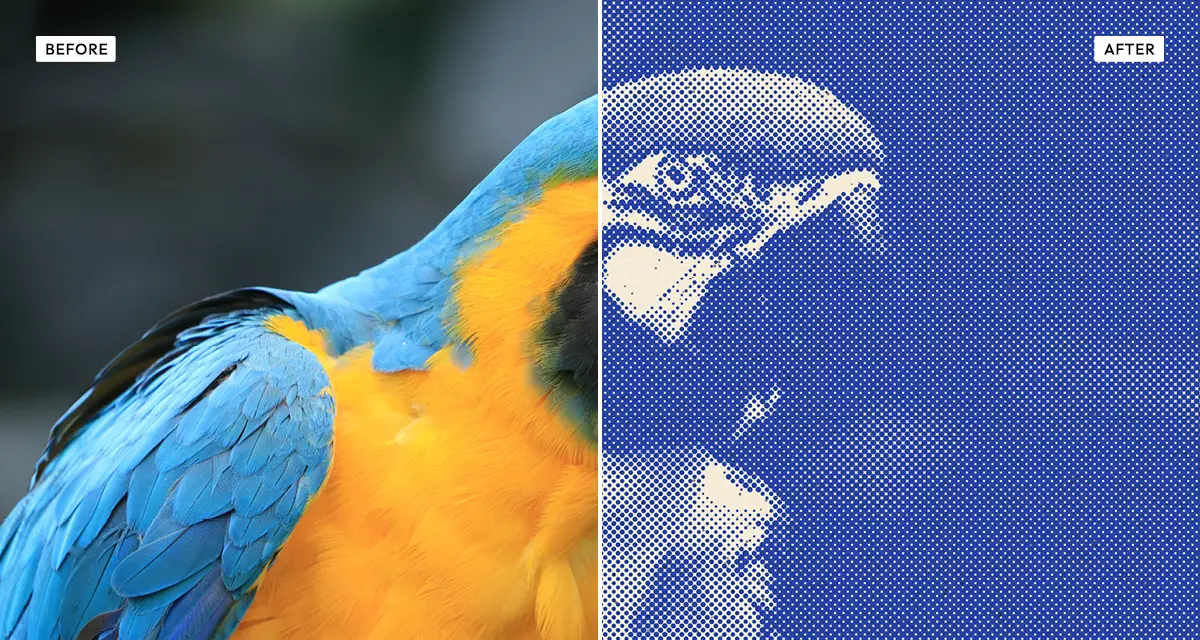
Printing presses cannot lay down a continuous tone. To reproduce a photograph they break it into a grid of dots that vary in size — large dots read as dark, small ones as light, and from a normal viewing distance the eye blends them into shades. That is halftoning, and it is why a newspaper photograph dissolves into dots when you look closely.
With two inks, each colour gets its own halftone screen, and the screens are rotated to different angles so the dots interleave instead of overlapping. Get the angle wrong and you get moiré — an ugly interference pattern. Get the registration slightly wrong, as cheap presses always do, and the two layers sit fractionally apart, producing the coloured fringe that reads instantly as print. The misregistration control adds that fringe deliberately.
What each control does
| Control | Range | Default | What it changes |
|---|---|---|---|
| Cell size | 3–30 px | 7 | Size of each halftone dot cell. Small is fine magazine screen; large is coarse poster print. |
| Screen angle | 0–90° | 45 | Rotation of the dot grid. 45° is the print standard because it is least visible to the eye. |
| Misregistration | 0–10 | 8 | Offset between the two ink layers. This is what makes it look genuinely printed. |
| Contrast | −100 to +200 | 30 | Tonal contrast before screening. Higher separates the two inks more cleanly. |
| Highlight cutoff | 0–60 | 12 | Below this value, dots drop out entirely, leaving bare paper in the highlights. |
| Shadow boost | 0–100 | 26 | Strengthens dots in dark areas so shadows fill in rather than staying speckled. |
| Smoothing | 0–100 | 10 | Softens the source before screening, reducing moiré on fine detail. |
| Grain | 0–100 | 22 | Ink grain and paper noise. |
| Speckle | 0–100 | 12 | Stray ink marks, as a real press leaves. |
Tips
- Keep screen angle near 45°. It is the print standard precisely because the eye notices that angle least.
- If fine detail shimmers, raise smoothing before shrinking the cell size — that shimmer is moiré.
- Raise misregistration to 6–10 for a cheaply-printed zine feel; drop it to 0–2 for clean modern screen print.
- Choose a warm paper stock such as cream or kraft. Bright white makes two-ink work look digital.
Common uses
Gig posters and flyers, zines, album covers, t-shirt and merchandise artwork, editorial illustration, packaging mock-ups, and any design that should look screen-printed rather than rendered.
Frequently asked questions
What is the Duo Halftone effect?
The Duo Halftone effect converts a photograph into two-colour halftone print, rebuilding the image from dots of two inks. It reproduces dot size, screen angle and misregistration, so the result looks like two-colour screen printing or risograph rather than a digital filter.
How do I make a photo look printed?
Break it into halftone dots and offset the ink layers slightly — that misregistration is what reads as print rather than filter. Which process to imitate, and how many inks to use, is compared on the halftone and print effects page.
How do I turn a photo into dots?
Set the cell size — small for a fine magazine screen, large for a coarse poster — and keep the screen angle near 45 degrees, which the eye notices least. Other ways to break an image into marks are compared on the halftone and print effects page.
Is the Duo Halftone effect free to use?
Yes. The Duo Halftone effect is free, and you can adjust every setting and preview the result without signing up. Credits are only needed to download at full original resolution; the preview and standard-resolution download cost nothing.
Do I need to upload my photo?
No. The Duo Halftone effect runs entirely in your browser, so your original photo is processed on your own device and never leaves it. If you are signed in and save a full-resolution download, the rendered result — not your original — is stored in your private account folder, encrypted with AES-256, and deleted automatically after 30 days.
What is halftone printing?
Halftone printing reproduces continuous tone by breaking an image into dots of varying size. Large dots read as dark and small dots as light, and at normal viewing distance the eye blends them into shades. Presses need it because ink cannot be laid down in continuously varying density.
Why does my halftone show a shimmering pattern?
That shimmer is moiré, an interference pattern between the dot grid and fine detail in your photo. Raise the smoothing control to soften the source before screening, or change the screen angle slightly. Reducing cell size usually makes moiré worse rather than better.
Can I use the Duo Halftone effect on client or commercial work?
Yes. Images you create with the Duo Halftone effect can be used for personal and commercial projects, including client work, packaging and merchandise. Full terms are on the licence page.
Related effects
For single-ink printing, see Risograin. Duotone maps tone onto two colours without dots, Engrave Halftone uses cross-hatched lines instead, and Old Newspaper applies a coarse single-ink newsprint screen.