Drop an image hereor click to chooseJPG, PNG, WebP
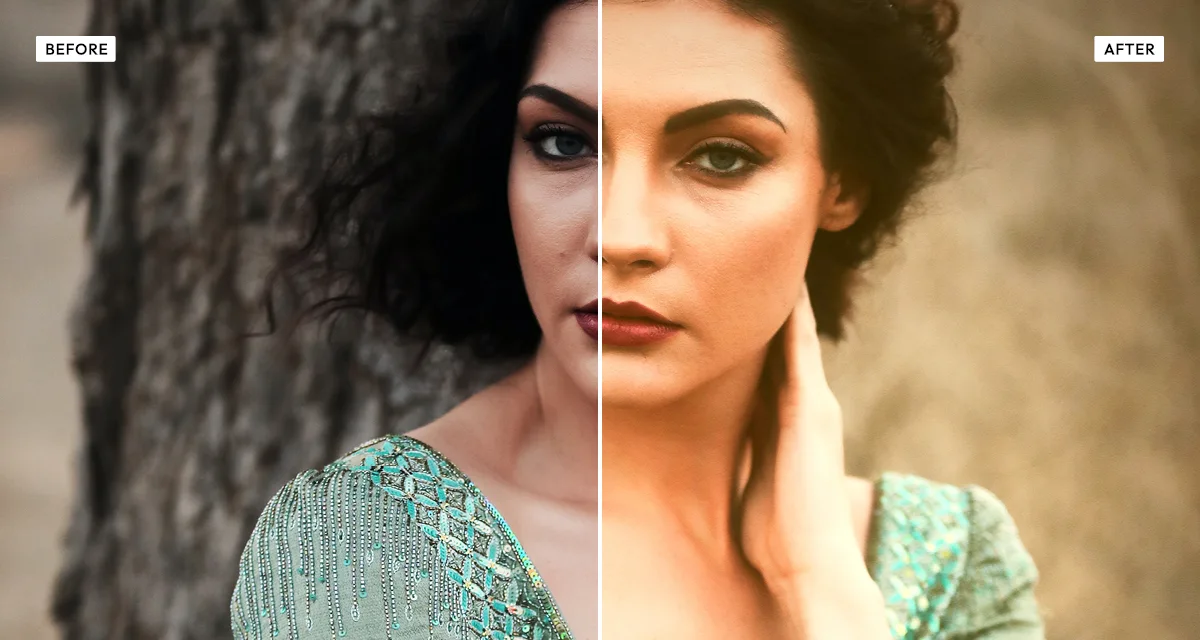
About the Warm Portrait Effect
Last updated 21 August 2026
How the effect works
Golden hour flatters faces for a specific reason. Low sun travels through more atmosphere, which scatters the blue out and leaves warm light arriving from a shallow angle. Warm light suppresses the blue and green in skin that reads as blotchiness, and the low angle wraps around the face instead of dropping hard shadows under the eyes and nose. Photographers plan whole shoots around that hour because no amount of lighting kit reproduces it cheaply.
Warming a photograph globally does not reproduce it. Push the temperature far enough to flatter skin and the whites go yellow, the background goes muddy, and the whole frame reads as a filter. That is why this effect has a separate skin control: overall warmth handles the scene, while skin is treated on its own so faces can glow while the rest of the image stays believable.
Glow and shadow lift supply the rest. Glow spreads highlights softly into their surroundings, which is what a diffused low sun does physically, and lifting the shadows imitates light bouncing back into the face from the ground rather than shadows falling to black.
What each control does
| Control | Range | Default | What it changes |
|---|---|---|---|
| Warmth | 0–100 | 50 | Overall colour temperature of the scene. |
| Skin | 0–100 | 30 | Skin tones treated separately, so faces glow without the whole frame going yellow. |
| Saturation | −100 to +100 | 10 | Colour intensity. Slightly positive suits golden hour, which is richer than midday. |
| Brightness | −100 to +100 | 10 | Overall exposure, raised slightly since warm light reads as brighter. |
| Shadow lift | 0–100 | 35 | Raises the black point, imitating light bouncing back into the face from the ground. |
| Glow | 0–100 | 30 | Spreads highlights softly outward, reproducing diffused low sun. |
| Contrast | −100 to +100 | −5 | Slightly negative. Golden-hour light is soft, and hard contrast undoes the effect. |
| Grain | 0–100 | 12 | A small amount keeps skin from looking plastic after the glow pass. |
| Vignette | 0–100 | 15 | Gentle edge darkening to hold attention on the face. |
Tips
- Raise skin before warmth. Warming the whole frame far enough to flatter a face turns whites yellow and backgrounds muddy.
- Keep contrast at or below zero. Golden-hour light is soft, and adding contrast fights the entire effect.
- Use glow sparingly on close-ups — above 50 it starts to erase skin texture and looks retouched.
- Works best on photographs already shot in soft or overcast light. Hard midday shadows point the wrong way and no amount of warming hides them.
Common uses
Portrait and headshot galleries, wedding and engagement photographs, family and newborn sessions, lifestyle and brand photography, social profile pictures, and any portrait shot in flat light that needs warming.
Frequently asked questions
What is the warm portrait effect?
The warm portrait effect adds golden-hour warmth to a portrait while treating skin tones separately, so faces glow without the whole image turning yellow. It also lifts shadows and adds a soft highlight glow, reproducing how low, diffused sunlight falls on a face.
How do I make skin look warmer in a photo?
Use the skin control rather than overall warmth — warming the whole frame far enough to flatter a face turns whites yellow and backgrounds muddy. Which effects are kind to skin and which are not is compared on the portrait photo effects page.
How do I fake golden hour light?
Three things together: warm the scene, lift the shadows, and add a soft highlight glow. The lift matters most and is the one people skip — low sun bounces off the ground back into the face, so golden-hour shadows are open rather than black. Keep contrast at or below zero; golden light is soft.
Is the warm portrait effect free to use?
Yes. The warm portrait effect is free, and you can adjust every setting and preview the result without signing up. Credits are only needed to download at full original resolution; the preview and standard-resolution download cost nothing.
Do I need to upload my photo?
No. The warm portrait effect runs entirely in your browser, so your original photo is processed on your own device and never leaves it. If you are signed in and save a full-resolution download, the rendered result — not your original — is stored in your private account folder, encrypted with AES-256, and deleted automatically after 30 days.
Why does golden hour light flatter faces?
Low sun travels through more atmosphere, which scatters the blue out and leaves warm light arriving at a shallow angle. The warmth suppresses the blue and green in skin that reads as blotchiness, and the low angle wraps around the face rather than casting hard shadows under the eyes and nose.
How do I warm a photo without making skin look orange?
Use the skin control rather than pushing overall warmth, which turns whites yellow and backgrounds muddy long before the face looks right. The wider question of which effects flatter skin is answered on the portrait photo effects page.
Can I use the warm portrait effect on client or commercial work?
Yes. Images you create with the warm portrait effect can be used for personal and commercial projects, including client work, packaging and merchandise. Full terms are on the licence page.
Related effects
For a cooler evening mood, see Day to Night. Polaroid warms and ages at the same time, Dramatic Black and White removes colour with skin-tone control, and Retro Analog Film adds film warmth with light leaks.