Drop an image here
or click to choose
JPG, PNG, WebP
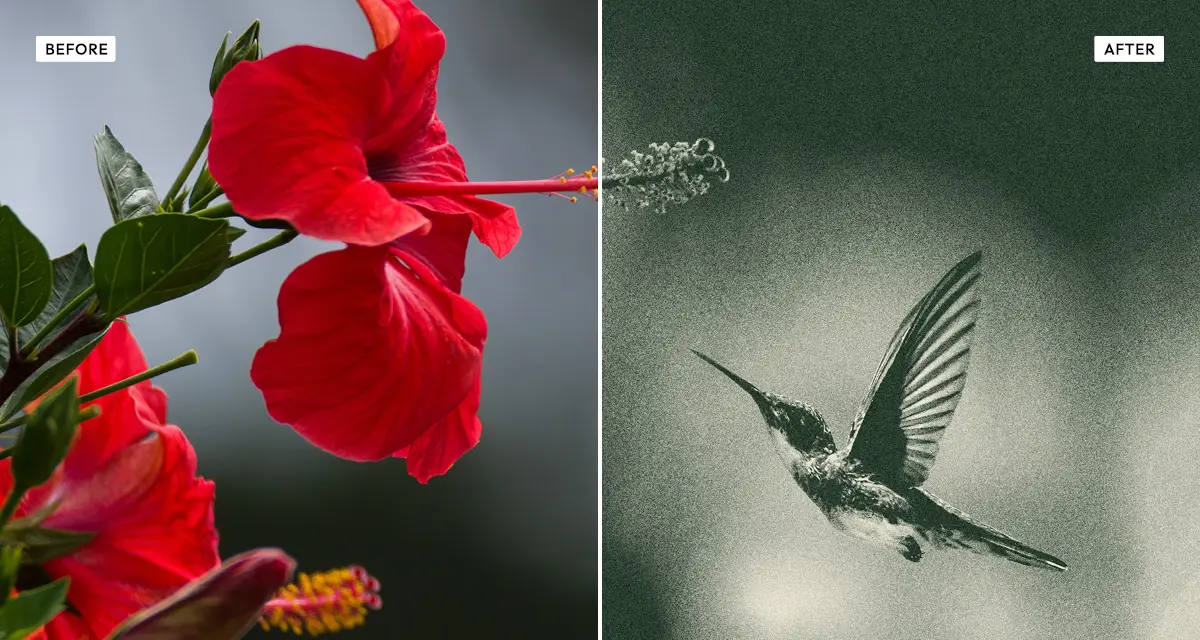
About the Risograin Effect
Last updated 21 August 2026
How the effect works
A risograph is closer to a mechanical stencil duplicator than a printer. Each colour needs its own drum and its own pass through the machine, and the ink is soy-based and sits on the paper rather than soaking in. Because a drum can only print one flat colour, tone has to be faked by breaking the image into coarse dots and grain — which is why risograph prints look posterised and textured rather than smooth.
The Risograin effect works the same way. Posterise collapses smooth gradients into flat steps the way a single ink drum would, grain supplies the noise that stands in for tone between those steps, and the colour filter maps the whole image onto one ink hue. Pushing contrast high is authentic here: risograph originals are usually prepared with hard contrast because the process loses subtle midtones anyway.
What each control does
| Control | Range | Default | What it changes |
|---|---|---|---|
| Filter intensity | 0–100 | 100 | How completely the image is mapped onto the chosen ink colour. |
| Custom hue | 0–360° | 200 | The ink colour, on the colour wheel. 200° is the classic riso blue. |
| Grain amount | 0–100 | 100 | Density of the grain that stands in for tone. Full by default — riso is a grainy process. |
| Grain size | 0–100 | 3 | Size of each grain particle. Small values read as fine ink texture; large as heavy noise. |
| Posterise | 0–100 | 25 | Collapses gradients into flat steps, as a single ink drum would. |
| Contrast | −100 to +200 | 100 | High by default. Risograph loses subtle midtones, so originals are prepared contrasty. |
| Brightness | −100 to +100 | 0 | Overall exposure, applied before the ink mapping. |
Tips
- Set the hue near 200° for classic riso blue, 350° for fluorescent pink, or 130° for the green risograph inks used in zines.
- Keep grain size small — under 10. Large grain stops reading as ink and starts reading as digital noise.
- Raise posterise for a more obviously printed result; lower it if faces are breaking into flat blocks.
- High contrast is correct here. If the image looks too harsh, lower brightness rather than contrast.
Common uses
Zines and small-press publishing, gig posters, album art, editorial illustration, event flyers, risograph print mock-ups before committing to a real print run, and social graphics that need to look handmade rather than rendered.
Frequently asked questions
What is the Risograin effect?
The Risograin effect is a photo filter that reproduces risograph printing. It maps the image onto a single ink colour, collapses smooth gradients into posterised steps, and adds heavy grain — the three traits that make risograph prints recognisable.
How do I make a photo look like a gig poster?
Map it onto a single vivid ink, posterise the gradients into flat steps and add heavy grain. Risograph is how most gig posters and zines are actually printed, so reproducing the process gets you closer than any colour filter. Set the hue near 200 degrees for classic riso blue or 350 for fluorescent pink.
How do I print a photo in one colour?
Choose a single ink hue and raise the filter intensity to 100, so the whole tonal range maps onto that one colour. Because one ink cannot vary in density, tone has to be faked with grain and posterisation — which is why both are set high here by default rather than treated as optional finishing.
Is the Risograin effect free to use?
Yes. The Risograin effect is free, and you can adjust every setting and preview the result without signing up. Credits are only needed to download at full original resolution; the preview and standard-resolution download cost nothing.
Do I need to upload my photo?
No. The Risograin effect runs entirely in your browser, so your original photo is processed on your own device and never leaves it. If you are signed in and save a full-resolution download, the rendered result — not your original — is stored in your private account folder, encrypted with AES-256, and deleted automatically after 30 days.
What is risograph printing?
Risograph printing is a stencil duplication process where each colour is printed in a separate pass using soy-based ink and a rotating drum. It is cheap at volume, ecologically light, and produces flat vivid colour with visible grain and slight misalignment — which is why zine and poster designers favour it.
Should I use Risograin or the Risograin Flattener?
Use Risograin when the result should still read as a photograph: it keeps tonal detail and renders it in one ink with grain and posterisation. Use the Risograin Flattener when it should read as a graphic — it collapses tone almost entirely, leaving shape rather than gradation.
Can I use the Risograin effect on client or commercial work?
Yes. Images you create with the Risograin effect can be used for personal and commercial projects, including client work, packaging and merchandise. Full terms are on the licence page.
Related effects
For a flatter single-ink wash, see Risograin Flattener. Duo Halftone prints in two inks with visible dots, Duotone maps tone onto two colours smoothly, and Old Newspaper applies coarse newsprint halftone.