Drop an image here
or click to choose
JPG, PNG, WebP
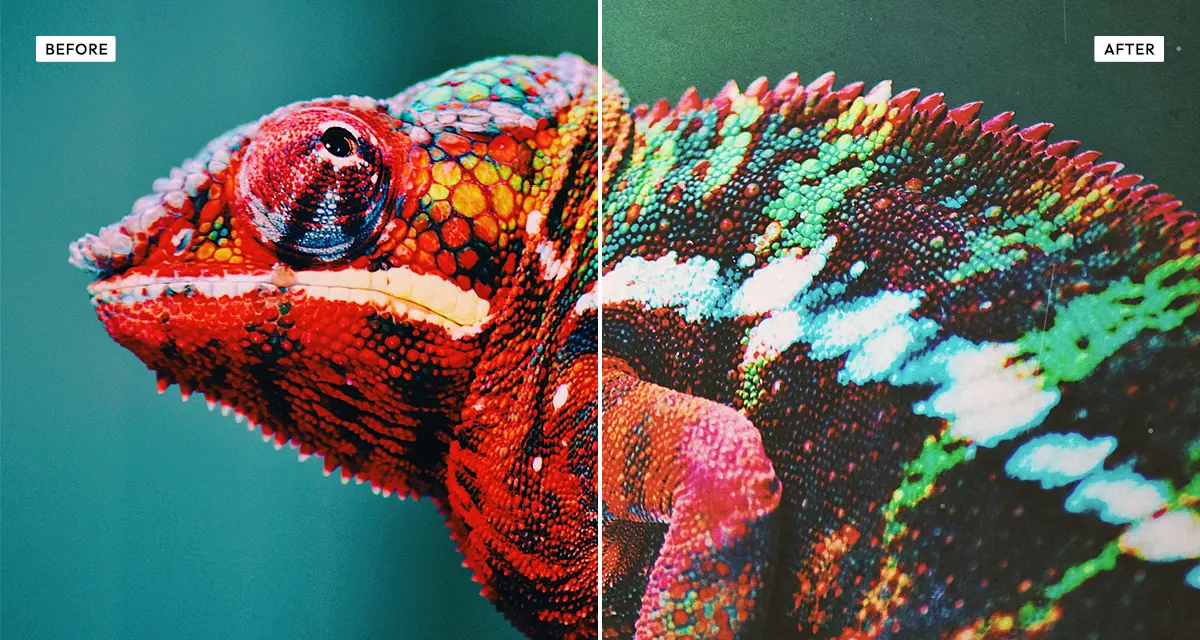
About the Polaroid Effect
Last updated 21 August 2026
How the effect works
Polaroid integral film develops in daylight in about fifteen minutes, and the chemistry never quite reaches the deep blacks or clean whites a digital sensor records. Shadows lift toward grey, highlights roll off early, and the dye layers push the whole frame warm. That limited range is what the eye reads as "instant photo" — not the white border, which is just the cartridge.
The Polaroid effect recreates this by compressing the tonal range from both ends, warming the midtones, and layering scanned dust and grain over the result. The fade control is the one doing most of the work: it lifts the black point the way real instant film does. Texture, dust and paper overlays add the physical imperfections a scan of a real print would carry.
What each control does
| Control | Range | Default | What it changes |
|---|---|---|---|
| Texture overlay | 0–100 | 35 | Strength of the scanned film texture laid over the photo. |
| Grain | 0–100 | 35 | Film grain density. Instant film is grainier than digital — 30–50 reads as authentic. |
| Dust | 0–100 | 43 | Specks and marks, as if the print had been handled and scanned. |
| Paper | 0–100 | 8 | Paper fibre showing through. Keep it low unless you want an obviously scanned print. |
| Warmth | 0–100 | 35 | The amber cast of instant film dyes. This is the single most recognisable Polaroid trait. |
| Fade | 0–100 | 30 | Lifts the black point so shadows go grey rather than black. The core of the instant-film look. |
| Saturation | −100 to +100 | −15 | Colour intensity. Slightly negative matches real film, which is never vivid. |
| Contrast | −100 to +100 | −5 | Overall contrast. Keep it near or below zero; instant film is a low-contrast medium. |
| Vignette | 0–100 | 30 | Darkening at the frame edges, as the camera lens produced. |
Tips
- Push warmth and fade together for the sun-bleached look of a 1970s Polaroid left in a drawer.
- Drop saturation below zero and raise contrast slightly for a moodier, darkroom-adjacent result.
- Dust and texture are what separate a genuine Polaroid effect from a plain warm filter — do not leave them at zero.
- For portraits keep grain under 40; heavy grain on skin reads as noise rather than film.
Common uses
Instagram and social posts, wedding galleries, lookbook covers, indie album art, blog headers, scrapbook and memory-book layouts, and any modern photo you want to feel as though it was shot on an instant camera.
Frequently asked questions
What is the Polaroid effect?
The Polaroid effect is a photo filter that makes a digital image look like an instant print. It compresses the tonal range, lifts the blacks toward grey, warms the colour and adds film grain and dust — the combination of traits that instant film produces and a digital camera does not.
How do I make a photo look like an instant camera print?
Lift the blacks and warm the midtones — instant film cannot reach true black, so its shadows sit grey. Add dust and texture afterwards, since the imperfections of a handled print are what stop it reading as a plain warm filter. For the other ways to age a photo, see old and vintage photo effects.
How do I fade a photo?
Raise the fade control, which lifts the black point so the darkest areas become grey instead of black. That is what physical fading actually does: a print loses its deepest tones first. Around 30 reads as gently aged; above 60 the image starts to look washed out and sun-damaged.
Is the Polaroid effect free to use?
Yes. The Polaroid effect is free, and you can adjust every setting and preview the result without signing up. Credits are only needed to download at full original resolution; the preview and standard-resolution download cost nothing.
Do I need to upload my photo?
No. The Polaroid effect runs entirely in your browser, so your original photo is processed on your own device and never leaves it. If you are signed in and save a full-resolution download, the rendered result — not your original — is stored in your private account folder, encrypted with AES-256, and deleted automatically after 30 days.
What is the difference between the Polaroid and Vintage effects?
The Polaroid effect reproduces instant-film chemistry: warm cast, lifted blacks, low contrast and fine grain. The Vintage effect instead layers five scanned analog textures — paper, noise and three kinds of scratch — over your photo. Choose Polaroid for the colour of instant film, Vintage for physical wear and damage.
Does the Polaroid effect add the white border?
No. The Polaroid effect reproduces the look of the image itself — the colour, fade, grain and dust — rather than the cartridge frame around it. That keeps your original aspect ratio intact, so the result works as a social post or a print without a border cropping into the picture.
Can I use the Polaroid effect on client or commercial work?
Yes. Images you create with the Polaroid effect can be used for personal and commercial projects, including client work, packaging and merchandise. Full terms are on the licence page.
Related effects
For physical wear rather than film chemistry, try Vintage. Retro Analog Film covers 35mm film simulation, Warm Portrait gives golden-hour skin tones without the aging, and Old Bleach takes the opposite route with washed-out, high-contrast tones.