Drop an image hereor click to chooseJPG, PNG, WebP
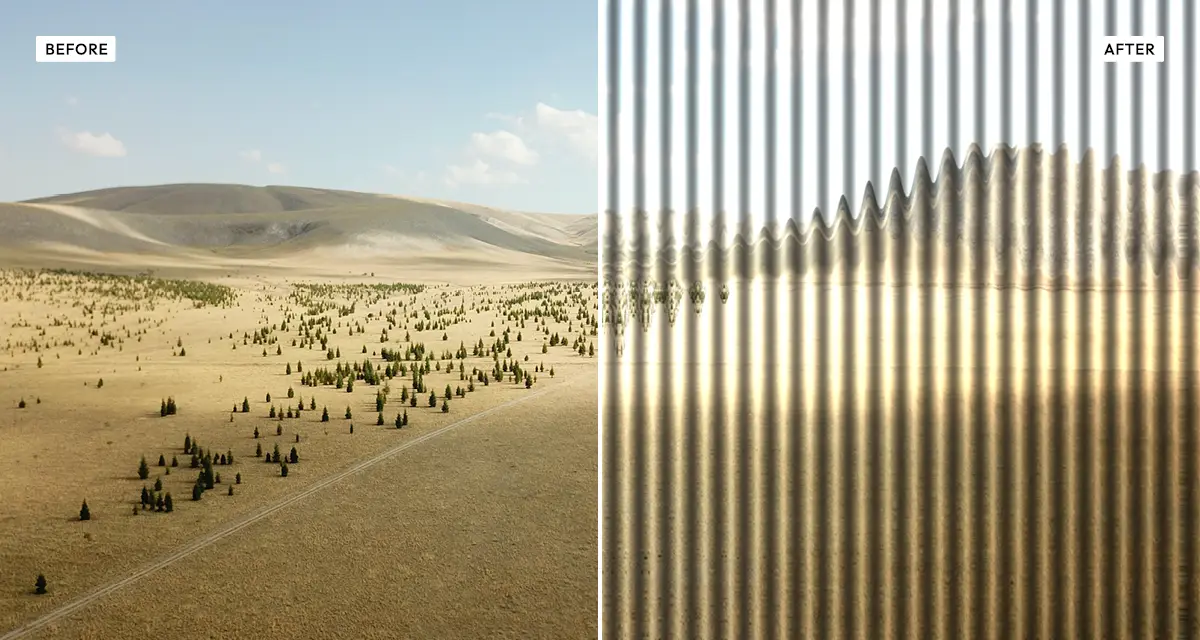
About the Reeded Glass Effect
Last updated 21 August 2026
How the effect works
Real reeded glass is a sheet moulded into parallel half-round ribs. Each rib acts as a narrow lens: it bends the light passing through it, so whatever sits behind the glass appears displaced sideways and repeated once per rib. Edges nearest each rib boundary distort most, which is why text seen through reeded glass turns unreadable while broad shapes and colour stay recognisable.
The reeded glass effect reproduces this by dividing your photo into stripes and offsetting the pixels inside each stripe along a curve, then adding a highlight and shadow at every rib edge so the surface reads as glass rather than a flat pattern. Turning on Soft glass (3D) smooths the refraction curve and lets light catch along the ribs, which is the closest match to real fluted glass.
What each control does
| Control | Range | Default | What it changes |
|---|---|---|---|
| Soft glass (3D) | on / off | on | Smooth refraction with light catching the ribs. Off gives a harder, flatter, more graphic slice. |
| Rib direction | vertical / horizontal | vertical | Vertical suits portraits and doors; horizontal suits landscapes and wide banners. |
| Stripe width | 6–80 px | 22 px | Width of each rib. Under 12 px reads as fine privacy glass; over 40 px as wide architectural fluting. |
| Displacement | 0–100 | 55 | How far pixels shift inside each rib. The main distortion strength. |
| Edge softness | 0–100 | 23 | Blur at each rib boundary. Higher hides the seams; 0 gives crisp cuts between slices. |
| Highlight / shadow depth | 0–100 | 80 | Contrast of the light and dark line on each rib. This is what sells the glass as three-dimensional. |
| Brightness | −100 to +100 | 0 | Lifts or lowers the whole image after the glass is applied. |
| Saturation | −100 to +100 | 0 | Colour intensity. Dropping toward −60 gives the cool, neutral look of real privacy glass. |
Tips
- Leave Soft glass (3D) on for anything meant to look like real glass; turn it off for a flat, poster-style slice.
- Narrow stripes with high displacement destroy detail — good for backgrounds, bad for faces. For portraits keep stripe width above 20 px.
- Push highlight / shadow depth past 90 and drop saturation to around −50 for the frosted look of shopfronts and studio partitions.
- Export as PNG when the result sits behind text; JPEG re-compression adds haloes along the high-contrast rib edges.
Common uses
Web hero backgrounds, app login screens, abstract poster art, album covers, fashion and product backdrops, and architectural-style design pieces. It is also a quick way to obscure a face, a licence plate or a screen in a photo while keeping the composition intact.
Frequently asked questions
What is the reeded glass effect?
The reeded glass effect is a photo filter that simulates looking through ribbed or fluted architectural glass. It splits the image into parallel stripes and refracts each one, so the picture behind appears sliced, displaced and repeated — the same way real reeded glass distorts whatever sits behind it.
How do I make a photo look like it is behind frosted or ribbed glass?
Slice the image into stripes and offset the pixels inside each one, then add a highlight and shadow at every rib edge so the surface reads as glass rather than a flat pattern. Turn on soft glass for smooth refraction that catches the light, which is the closest match to real fluted glass.
How do I obscure a face or a screen in a photo stylishly?
Narrow stripes with high displacement destroy detail while keeping the composition intact, which is how real reeded glass makes text unreadable but leaves shapes recognisable. Check the result at full size before publishing — wide ribs can still leave a face identifiable.
Is the reeded glass effect free to use?
Yes. The reeded glass effect is free, and you can adjust every setting and preview the result without signing up. Credits are only needed to download at full original resolution; the preview and standard-resolution download cost nothing.
Do I need to upload my photo?
No. The reeded glass effect runs entirely in your browser, so your original photo is processed on your own device and never leaves it. If you are signed in and save a full-resolution download, the rendered result — not your original — is stored in your private account folder, encrypted with AES-256, and deleted automatically after 30 days.
What is the difference between reeded glass and fluted glass?
In practice the terms are used interchangeably. Reeded glass traditionally describes narrow half-round ribs, while fluted glass describes wider, shallower channels. Both produce the same kind of vertical refraction, so this tool covers both: use a stripe width under 15 px for reeded and 30 px or more for fluted.
Which file formats does the reeded glass effect support?
You can load JPG, PNG and WebP images, and export the finished result as either JPEG or lossless PNG. PNG is the better choice when the image will be layered behind text, because JPEG compression can leave visible haloes along the high-contrast rib edges.
Can I use the reeded glass effect on client or commercial work?
Yes. Images you create with the reeded glass effect can be used for personal and commercial projects, including client work, packaging and merchandise. Full terms are on the licence page.
Related effects
For glass and light distortion, try Prismatic Light for RGB shift and lens flare, or Motion Blur for directional streaking. For a flatter graphic treatment of the same photo, Duotone and Pixelator work well layered after a glass pass.