Drop an image hereor click to chooseJPG, PNG, WebP
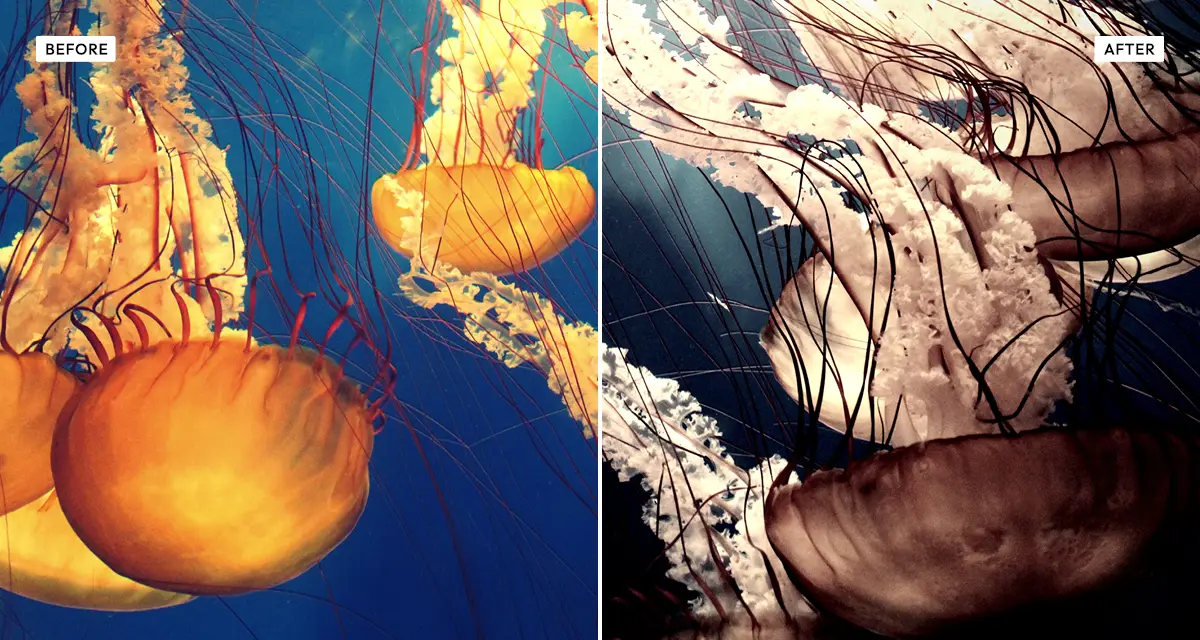
About the Old Bleach Effect
Last updated 21 August 2026
How the effect works
In normal colour film processing, bleach removes the developed silver and leaves only the colour dyes. Skip or shorten that step and the silver stays, sitting on top of the dye image like a black-and-white photograph printed over a colour one. The result is a picture that is simultaneously desaturated and extremely contrasty — a combination normal grading cannot produce, because reducing saturation usually flattens an image rather than hardening it.
Cinematographers use it for exactly that quality: Saving Private Ryan, Se7en and Minority Report all used bleach bypass or a digital equivalent. The Old Bleach effect separates the two halves so you can control them independently — desaturation strips the dye layer, contrast stands in for the retained silver, and the highlight and shadow controls decide how far each end of the range is pushed before it clips.
What each control does
| Control | Range | Default | What it changes |
|---|---|---|---|
| Desaturation | 0–100 | 70 | How much colour is stripped. Bleach bypass desaturates heavily but rarely to full grey. |
| Contrast | 0–200 | 70 | Stands in for retained silver. This is what makes the effect harsh rather than merely faded. |
| Highlights | 0–100 | 30 | How far bright areas are pushed toward white. High values blow them out entirely. |
| Shadows | 0–100 | 25 | How far dark areas are crushed toward black. |
| Tint amount | 0–100 | 45 | Strength of the colour cast left behind, giving the metallic quality of the process. |
| Grain | 0–100 | 15 | Film grain. Bleach bypass exaggerates existing grain, so a little goes a long way. |
| Vignette | 0–100 | 20 | Edge darkening. |
Tips
- The signature of bleach bypass is high contrast with low saturation. If you lower one, do not lower the other.
- Keep desaturation around 60–80. Pushing to 100 gives plain black and white and loses the metallic cast entirely.
- Raise highlights past 50 for the blown-out, war-film look; keep it under 30 for something more restrained.
- The effect is unforgiving on faces — it exaggerates skin texture. Lower contrast for portraits.
Common uses
Film stills and cinematic grading, poster and title art, editorial and documentary photography, band and album imagery, sports and action shots, and any photo that needs to feel harsh, bleak or forensic.
Frequently asked questions
What is the Old Bleach effect?
The Old Bleach effect reproduces bleach bypass, a film processing technique in which the bleaching step is skipped so developed silver remains in the print. The result is heavily desaturated colour combined with very high contrast, giving pale highlights, crushed shadows and a metallic cast.
How do I make a photo desaturated but still high contrast?
Lower saturation and raise contrast at the same time, which normal grading resists because reducing colour usually flattens an image. That specific combination is what bleach bypass produces, and it is why the look reads as harsh rather than merely muted. Keep desaturation around 60 to 80 so a metallic cast survives.
How do I get a gritty war film or crime drama look?
Strip most of the colour, push contrast hard, and let the highlights blow out. Saving Private Ryan, Se7en and Minority Report all used bleach bypass or a digital equivalent for exactly that reason: it removes the warmth of colour film while making every edge harder.
Is the Old Bleach effect free to use?
Yes. The Old Bleach effect is free, and you can adjust every setting and preview the result without signing up. Credits are only needed to download at full original resolution; the preview and standard-resolution download cost nothing.
Do I need to upload my photo?
No. The Old Bleach effect runs entirely in your browser, so your original photo is processed on your own device and never leaves it. If you are signed in and save a full-resolution download, the rendered result — not your original — is stored in your private account folder, encrypted with AES-256, and deleted automatically after 30 days.
What is bleach bypass used for in film?
Bleach bypass is used when a scene needs to feel harsh, cold or documentary. Saving Private Ryan, Se7en and Minority Report all used the process or a digital equivalent. It suits war, crime and dystopian material because it removes the warmth of colour film while making every edge harder.
How is Old Bleach different from a black and white filter?
A black and white filter removes colour completely. The Old Bleach effect keeps a residual colour cast and pairs it with extreme contrast, which is what makes bleach bypass recognisable. For a true monochrome conversion with channel control, use Dramatic Black and White instead.
Can I use the Old Bleach effect on client or commercial work?
Yes. Images you create with the Old Bleach effect can be used for personal and commercial projects, including client work, packaging and merchandise. Full terms are on the licence page.
Related effects
For full monochrome with channel control, see Dramatic Black and White. Cinematic Verde offers a different film-grade look, Grainy Film Poster pushes grain much further, and Retro Analog Film is the gentler analog option.