Drop an image here
or click to choose
JPG, PNG, WebP
About the Pixelator Effect
Last updated 21 August 2026
How the effect works
Standard pixelation averages each block of pixels and paints it as a hard square. It is the visual language of censorship — blurred faces, redacted number plates — which is exactly why using it decoratively rarely works. The eye has learned that hard square pixels mean something is being hidden.
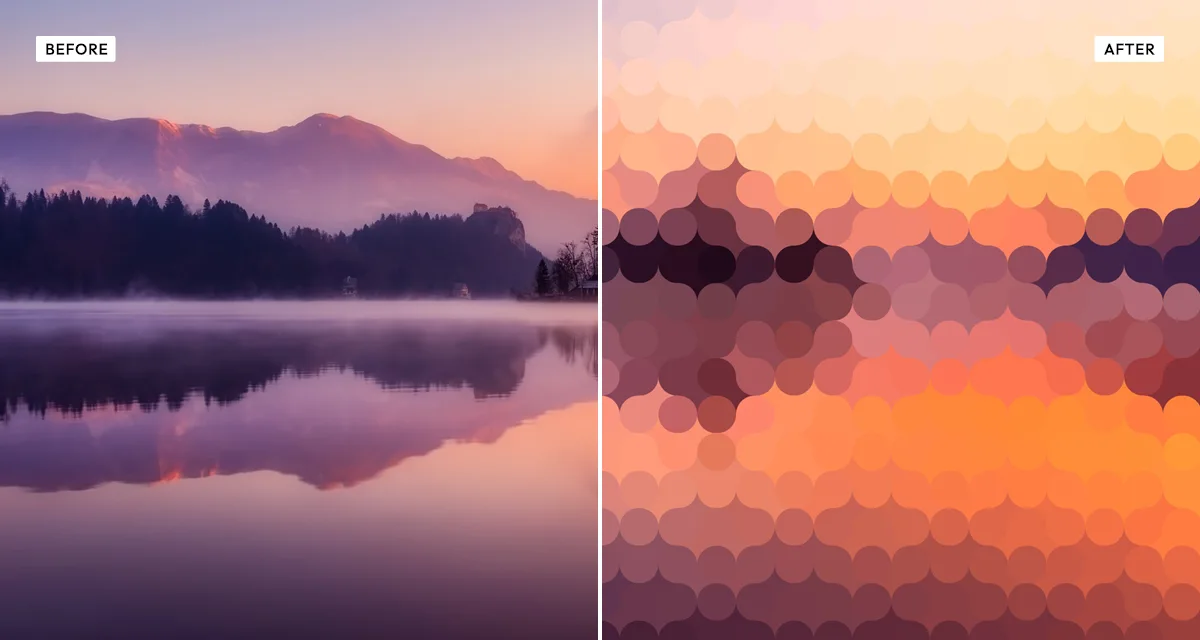
Rounding the tiles breaks that association immediately. A grid of soft dots reads as mosaic, halftone or beadwork rather than redaction, and adding slight size randomness stops it looking machine-generated. The overlap control lets tiles grow past their cell boundary so they touch or intersect, which is what turns a grid into a surface.
The background blur underneath matters more than it sounds. With it, gaps between tiles show a soft version of the original rather than flat paper, so the mosaic sits on the image instead of replacing it — the difference between a picture made of dots and a picture with dots over it.
What each control does
| Control | Range | Default | What it changes |
|---|---|---|---|
| Cell size | 1–15 | 3 | Size of each tile. Small keeps the subject readable; large abstracts it heavily. |
| Overlap | 100–160% | 100 | How far each tile grows past its cell. Above 120 the tiles touch and form a continuous surface. |
| Roundness | 0–50 | 50 | Corner rounding. 0 gives hard squares and the censored look; 50 gives full circles. |
| Tile opacity | 50–100 | 100 | Transparency of each tile, letting the blurred image below show through. |
| Background blur | 0–30 | 30 | Softness of the image behind the tiles. This is what stops gaps reading as flat paper. |
| Randomness | 0–100 | 12 | Slight variation in tile size. A little stops the grid looking machine-made; a lot looks scattered. |
| Saturation | −50 to +100 | 15 | Colour intensity. Positive suits mosaics, since averaging tends to mute colour. |
| Contrast | −50 to +100 | 10 | Tonal separation between tiles. |
Tips
- Keep roundness at or near 50 unless you specifically want the censored look — hard squares carry that association whether you intend it or not.
- Raise overlap above 120 for a continuous beaded surface; leave it at 100 for a clean separated grid.
- For portraits use a small cell size, around 2–4. Faces stop being recognisable very quickly as cells grow.
- A little randomness — 10 to 20 — is what separates a handmade-looking mosaic from an obviously automated one.
Common uses
Album and event artwork, poster design, social graphics, website hero images, presentation backgrounds, abstract prints, and stylised portraits where the subject should be suggested rather than shown.
Frequently asked questions
What is the pixelator effect?
The pixelator effect rebuilds a photograph from rounded tiles rather than hard squares. You control tile size, corner rounding, overlap and randomness, so the result reads as a designed mosaic instead of the blocky pixelation used to censor faces and number plates.
How do I turn a photo into a mosaic?
Raise the roundness control so the tiles are circles rather than squares, and push overlap above 120 so they touch and form a continuous surface. Add a little size randomness, around 10 to 20, which is what separates a handmade-looking mosaic from an obviously automated grid.
How do I pixelate a photo for a poster or album cover?
Keep cell size small, around 2 to 4, so the subject stays suggested rather than lost, and leave background blur high so the gaps show a soft version of the image. For the other effects that survive being shrunk to a thumbnail, see album cover effects.
Is the pixelator effect free to use?
Yes. The pixelator effect is free, and you can adjust every setting and preview the result without signing up. Credits are only needed to download at full original resolution; the preview and standard-resolution download cost nothing.
Do I need to upload my photo?
No. The pixelator effect runs entirely in your browser, so your original photo is processed on your own device and never leaves it. If you are signed in and save a full-resolution download, the rendered result — not your original — is stored in your private account folder, encrypted with AES-256, and deleted automatically after 30 days.
How do I pixelate a photo without it looking censored?
Raise the roundness control. Hard square pixels are the visual language of censorship, so the eye reads them as something being hidden. Rounded tiles read as mosaic or beadwork instead. Adding a little size randomness, around 10 to 20, completes the effect by stopping the grid looking machine-generated.
Can I use the pixelator to hide a face or a number plate?
It can obscure them, but it is designed as a decorative effect rather than a privacy tool. If you need to hide something reliably, set roundness to 0 and a large cell size so no detail survives — and check the result at full size before publishing, since a coarse mosaic can still leave a recognisable shape.
Can I use the pixelator effect on client or commercial work?
Yes. Images you create with the pixelator effect can be used for personal and commercial projects, including client work, packaging and merchandise. Full terms are on the licence page.
Related effects
For printed dots rather than tiles, see Duo Halftone. Engrave Halftone uses etched lines instead, Reeded Glass distorts rather than rebuilds, and Mesh Gradients generates abstract colour from nothing.