Drop an image hereor click to chooseJPG, PNG, WebP
About the Grainy Film Poster Effect
Last updated 21 August 2026
How the effect works
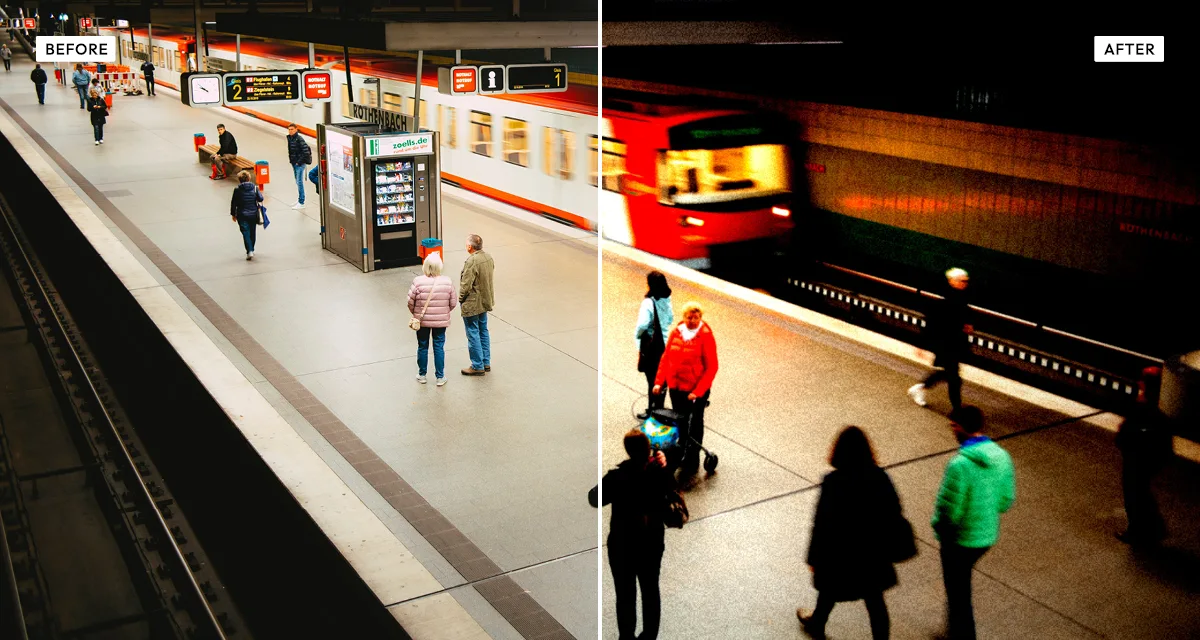
Push processing means deliberately underexposing film and then over-developing it to compensate. A roll rated at ISO 400 shot as though it were 1600 gets extra time in the developer, which recovers a usable image but exaggerates everything: grain grows, contrast climbs, shadows block up into pure black and highlights blow to paper white. Photographers did it because the alternative was no photograph at all.
Designers then borrowed the look on purpose. A pushed frame reads as urgent, documentary and slightly desperate, which is exactly the register a thriller poster or a post-punk record sleeve wants. The grain also survives being blown up to poster size, where a clean digital file starts to look sterile.
The black point and white point controls are the important pair here: they set where the tonal range clips at each end, which is what push processing does physically. Grain goes on at 70 by default because restraint is not the point of this effect.
What each control does
| Control | Range | Default | What it changes |
|---|---|---|---|
| Contrast | −100 to +200 | 55 | Range runs to 200 because pushed film is far contrastier than normal exposure. |
| Brightness | −100 to +100 | 0 | Overall exposure before the clipping below is applied. |
| Black point | 0–80 | 15 | Where shadows clip to pure black. Raising it blocks up the shadows the way over-development does. |
| White point | 20–100 | 95 | Where highlights blow to white. Lowering it blows them earlier. |
| Softness | 0–100 | 20 | Slight blur before the grain, imitating the loss of fine detail in a pushed negative. |
| Grain | 0–100 | 70 | High by default. This is the effect — anything under 40 is a different look entirely. |
| Grain size | 0–100 | 5 | Particle size. Larger grain reads as a faster stock or a bigger enlargement. |
| Vignette | 0–100 | 25 | Edge darkening, common on fast lenses shot wide open in low light. |
Tips
- Start with the ISO 3200 preset and pull back, rather than building up from Classic. This effect works better over-applied then reduced.
- Raise black point before contrast. Blocked-up shadows are what makes it read as pushed film rather than just a contrasty photo.
- Larger grain size suits images that will be printed big. On screen, keep it under 8 or it reads as digital noise.
- Works best on images with a clear subject against a simple background. Fine detail disappears into the grain.
Common uses
Film and gig posters, album and single artwork, band photography, editorial and documentary layouts, book covers, zines, and any image that needs to feel urgent, grainy and shot in a hurry.
Frequently asked questions
What is the grainy film poster effect?
The grainy film poster effect reproduces push-processed film: heavy grain, blocked-up blacks and blown highlights. It is the look of a roll deliberately underexposed and over-developed to shoot in low light, which film and record designers adopted because it reads as urgent and documentary.
How do I make a photo look grainy?
Raise the grain control — the default of 70 here gives the heavy push-processed look, far more than a normal film simulation. Grain size decides the character: keep it under 8 on screen, and larger for images that will be printed big, where fine grain disappears.
How do I get an over-processed look on a photo?
Push three things past comfortable: contrast, grain, and the black and white points. Raising the black point blocks shadows into solid black and lowering the white point blows highlights to paper white, which is what over-development does physically. The result reads as urgent and documentary rather than polished.
Is the grainy film poster effect free to use?
Yes. The grainy film poster effect is free, and you can adjust every setting and preview the result without signing up. Credits are only needed to download at full original resolution; the preview and standard-resolution download cost nothing.
Do I need to upload my photo?
No. The grainy film poster effect runs entirely in your browser, so your original photo is processed on your own device and never leaves it. If you are signed in and save a full-resolution download, the rendered result — not your original — is stored in your private account folder, encrypted with AES-256, and deleted automatically after 30 days.
What is push processing in film photography?
Push processing means shooting film at a higher ISO than it is rated for and then over-developing it to compensate. A 400 roll shot at 1600 and pushed two stops produces a usable image in low light, at the cost of much heavier grain, higher contrast and lost shadow detail.
How do I add film grain to a photo?
Drop the photo in and raise the grain control — the default of 70 gives the heavy push-processed look. For subtler 35mm grain use Retro Analog Film instead, where grain sits around 15 and the emphasis is on colour and light leaks rather than texture.
Can I use the grainy film poster effect on client or commercial work?
Yes. Images you create with the grainy film poster effect can be used for personal and commercial projects, including client work, packaging and merchandise. Full terms are on the licence page.
Related effects
For finer 35mm grain with light leaks, see Retro Analog Film. Dramatic Black and White handles contrast-led monochrome, Old Bleach strips colour while keeping harshness, and Texturizer adds physical scratches and dust.