Drop an image here
or click to choose
JPG, PNG, WebP
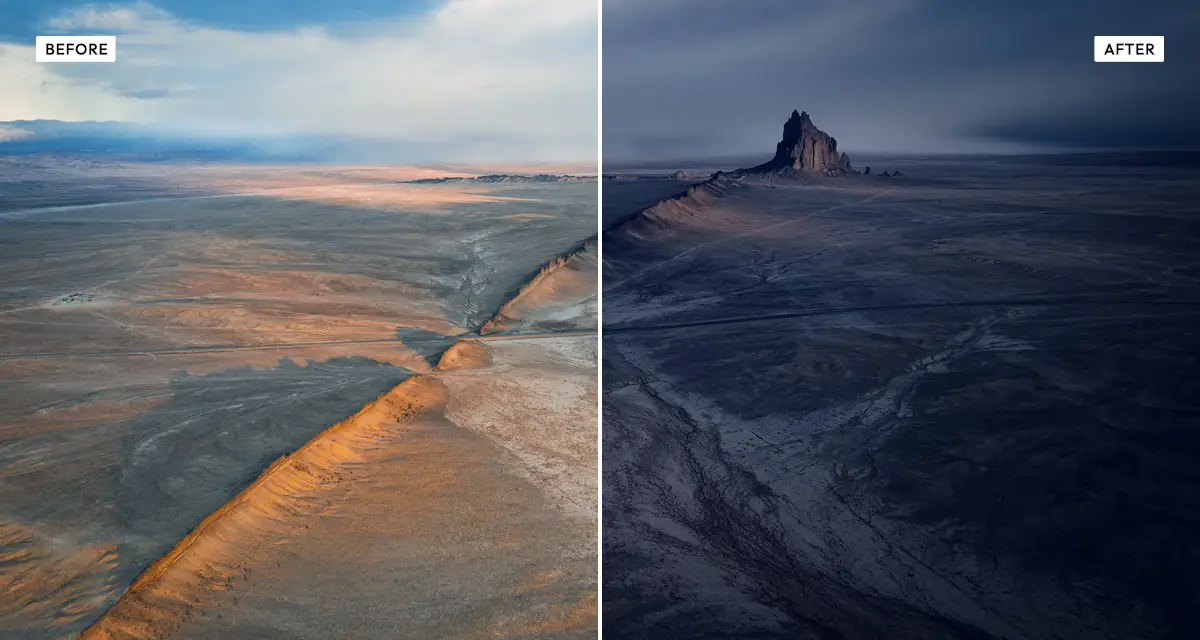
About the Day to Night Effect
Last updated 21 August 2026
How the effect works
Filming at night is expensive and technically awkward, so cinematographers have shot day-for-night since the silent era: expose for daylight, then underexpose and filter to suggest moonlight. It works because human night vision is not simply a dimmer version of daytime sight. In low light the eye loses colour sensitivity and shifts blue — the Purkinje effect — so a cool, desaturated, high-contrast image reads as night even when the shadows are physically wrong.
The Day to Night effect applies the same reasoning. Darkness and shadow crush remove the daylight exposure, cool temperature and blue tint supply the Purkinje shift, and saturation drops because night vision is nearly monochrome. The spatial controls matter most: sky preserve stops the sky going flat black, and ground darken pushes the lower frame down, mimicking how moonlight falls off with distance.
What each control does
| Control | Range | Default | What it changes |
|---|---|---|---|
| Darkness | 0–100 | 60 | Overall exposure reduction. The foundation of the effect. |
| Shadow crush | 0–100 | 40 | How aggressively dark areas are pushed to black. |
| Highlight preserve | 0–100 | 55 | Protects bright areas so lights and reflections still read as light sources. |
| Contrast | −100 to +100 | 15 | Slightly positive by default; night scenes read as contrastier than they are. |
| Cool temperature | 0–100 | 45 | Shifts white balance toward blue, imitating how the eye sees in low light. |
| Blue tint | 0–100 | 55 | Adds a blue cast on top of the temperature shift. The classic moonlight colour. |
| Saturation | −100 to +100 | −25 | Night vision is nearly colourless, so negative values read as more convincing. |
| Sky preserve | 0–100 | 40 | Holds detail in the sky so it does not become a flat black shape. |
| Ground darken | 0–100 | 35 | Pushes the lower frame darker, imitating moonlight falling off with distance. |
| Vignette | 0–100 | 45 | Edge darkening. Higher than most effects, because darkness at the frame edge sells the scene. |
Tips
- Raise sky preserve first if the result looks fake. A flat black sky is the most common giveaway.
- Keep highlight preserve above 40 for street scenes, so windows and lamps still look lit.
- Overcast source photos convert best. Hard midday shadows point the wrong way for moonlight and give the trick away.
- Push blue tint past 70 only for stylised results; real moonlight is cooler than daylight but not blue.
Common uses
Film and video previsualisation, storyboard frames, album and book covers, atmospheric social posts, architectural visualisation at night, travel photography, and rescuing a location shot taken at the wrong time of day.
Frequently asked questions
What is the Day to Night effect?
The Day to Night effect converts a daylight photograph into a night scene by reducing exposure, cooling the colour toward blue, crushing shadows and desaturating — the same combination cinematographers use when they shoot day-for-night rather than filming after dark.
How do I turn a daytime photo into a night photo?
Reduce exposure, cool the colour toward blue, crush the shadows and drop saturation — then protect the sky so it does not go flat black, which is the most common giveaway. Overcast source photos convert best, because hard midday shadows fall in a direction moonlight never would.
How do I make a photo look like moonlight?
Cool the white balance and add a blue tint, but keep it restrained — real moonlight is cooler than daylight rather than actually blue. Drop saturation toward minus 25, since human night vision is nearly colourless, and keep highlight protection above 40 so lamps and windows still read as light sources.
Is the Day to Night effect free to use?
Yes. The Day to Night effect is free, and you can adjust every setting and preview the result without signing up. Credits are only needed to download at full original resolution; the preview and standard-resolution download cost nothing.
Do I need to upload my photo?
No. The Day to Night effect runs entirely in your browser, so your original photo is processed on your own device and never leaves it. If you are signed in and save a full-resolution download, the rendered result — not your original — is stored in your private account folder, encrypted with AES-256, and deleted automatically after 30 days.
What is day-for-night?
Day-for-night is a filming technique where a scene is shot in daylight and then graded to look like night. It has been used since the silent era because lighting a real night exterior is slow and expensive. The grade works by exploiting how human night vision loses colour and shifts blue in low light.
Which photos work best with the Day to Night effect?
Overcast and shaded photos convert most convincingly, because they have no strong directional sunlight. Hard midday shadows are the main problem: they fall in a direction moonlight never would, and the eye notices even when it cannot say why. Skies with cloud detail also hold up better than flat blue ones.
Can I use the Day to Night effect on client or commercial work?
Yes. Images you create with the Day to Night effect can be used for personal and commercial projects, including client work, packaging and merchandise. Full terms are on the licence page.
Related effects
For cinematic grading in daylight, try Cinematic Verde. Dramatic Black and White handles contrast-led conversion, Prismatic Light adds lens flare and refraction to night scenes, and Warm Portrait goes the other way, toward golden hour.