Drop an image hereor click to chooseJPG, PNG, WebP
About the Coolage Effect
Last updated 21 August 2026
How the effect works
Photomontage is older than photography being taken seriously as art. Dada artists cut up printed pages and reassembled them in the 1920s; punk and post-punk design lived on the same technique in the 1970s, because a photocopier and a pair of scissors were the whole budget. What unifies both is that the fragments came from printed sources, so every piece carried its own halftone dot screen.
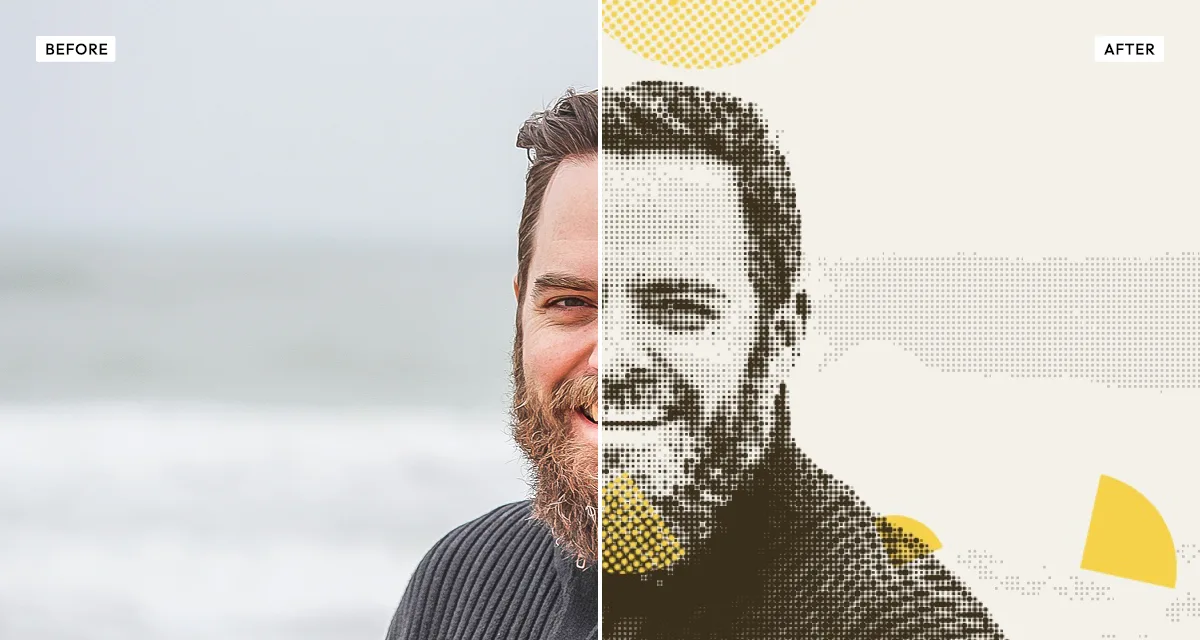
Coolage reproduces that automatically. It places a set number of shapes over your photograph, sizes them randomly within a range you control, and fills a proportion of them with a halftone dot pattern instead of the flat image. The result is a picture that reads as assembled rather than captured — some fragments smooth, some visibly printed, edges meeting where they should not.
Shape count and the min and max size controls set how busy the montage is, pattern ratio decides how many fragments get the dot treatment, and dot spacing sets how coarse that screen is. Raising contrast first helps, because halftone loses midtones the same way a real press does.
What each control does
| Control | Range | Default | What it changes |
|---|---|---|---|
| Shape count | 3–20 | 10 | Number of collage fragments. Under 6 reads as a few torn pieces; over 15 as a dense montage. |
| Min size | 5–40 | 15 | Smallest fragment, as a share of the frame. Low values add confetti-like detail. |
| Max size | 20–80 | 42 | Largest fragment. Keep well above min size or every piece comes out the same. |
| Pattern ratio | 0–100 | 55 | Share of fragments filled with halftone rather than the flat image. 55 gives a readable mix. |
| Dot spacing | 3–18 px | 6 | Coarseness of the halftone screen. Small is magazine-fine, large is newsprint-coarse. |
| Contrast | −50 to +150 | 30 | Raised by default: halftone loses midtones, so the source needs to be harder than normal. |
| Brightness | −100 to +100 | 0 | Overall exposure, applied before the screening. |
Tips
- Keep max size at least twice min size. Equal-sized fragments look like a grid, not a collage.
- Portraits work best with fewer, larger shapes — 6 to 8 — so the face stays readable through the fragmentation.
- Raise contrast before anything else. Halftone eats midtones, and a flat source turns to mush.
- For a punk-zine look, push pattern ratio above 80 and dot spacing to 12 or more, so almost everything reads as photocopied print.
Common uses
Zine covers and spreads, gig posters, album artwork, editorial illustration, social graphics, mood boards, and any design that should look cut out and pasted rather than photographed.
Frequently asked questions
What is the Coolage effect?
Coolage is a collage effect that turns one photograph into a halftone photomontage. It scatters shapes across the image and fills some of them with printed dot patterns, so the picture breaks into overlapping fragments that look cut from printed pages rather than captured in a single frame.
How do I make a collage from one photo?
Coolage builds it automatically: it scatters shapes across your single image and fills some of them with halftone dot patterns, so the picture breaks into overlapping fragments. You do not need several photos or to cut anything out by hand — set how many fragments you want and how many get the printed treatment.
How do I make a photo look cut and pasted?
Fragment the image and give the pieces different treatments, so some read as smooth photograph and others as printed matter. That contrast is what sells a montage: real cut-up collage came from printed sources, so every fragment carried its own halftone screen. Six to eight larger shapes keeps a face readable.
How do I make a photo collage online for free?
Drop one photograph into Coolage and it builds the collage automatically — you do not need to cut out or arrange anything by hand. Set how many fragments you want, how large they should be, and how many get the halftone treatment, then download. It is free and needs no account.
Do I need to upload my photo?
No. The Coolage effect runs entirely in your browser, so your original photo is processed on your own device and never leaves it. If you are signed in and save a full-resolution download, the rendered result — not your original — is stored in your private account folder, encrypted with AES-256, and deleted automatically after 30 days.
Do I need more than one photo to make a collage?
No. Coolage builds the montage from a single photograph by fragmenting and re-treating it, rather than combining several images. That means you get a collage look from one picture, which is what makes it fast compared with assembling a montage by hand in a layout tool.
What is a halftone collage?
A halftone collage combines two printing-era techniques: photomontage, where printed fragments are cut and reassembled, and halftone, where continuous tone is reproduced as a grid of dots. Together they give the look of artwork built from magazine and newspaper clippings, which is the visual language of Dada and of punk zine design.
Can I use the Coolage effect on client or commercial work?
Yes. Images you create with the Coolage effect can be used for personal and commercial projects, including client work, packaging and merchandise. Full terms are on the licence page.
Related effects
For straight halftone without the collage, see Duo Halftone. Risograin gives single-ink risograph printing, Old Newspaper applies a coarse newsprint screen, and Photocopy Scan adds photocopier grunge.