Drop an image hereor click to chooseJPG, PNG, WebP
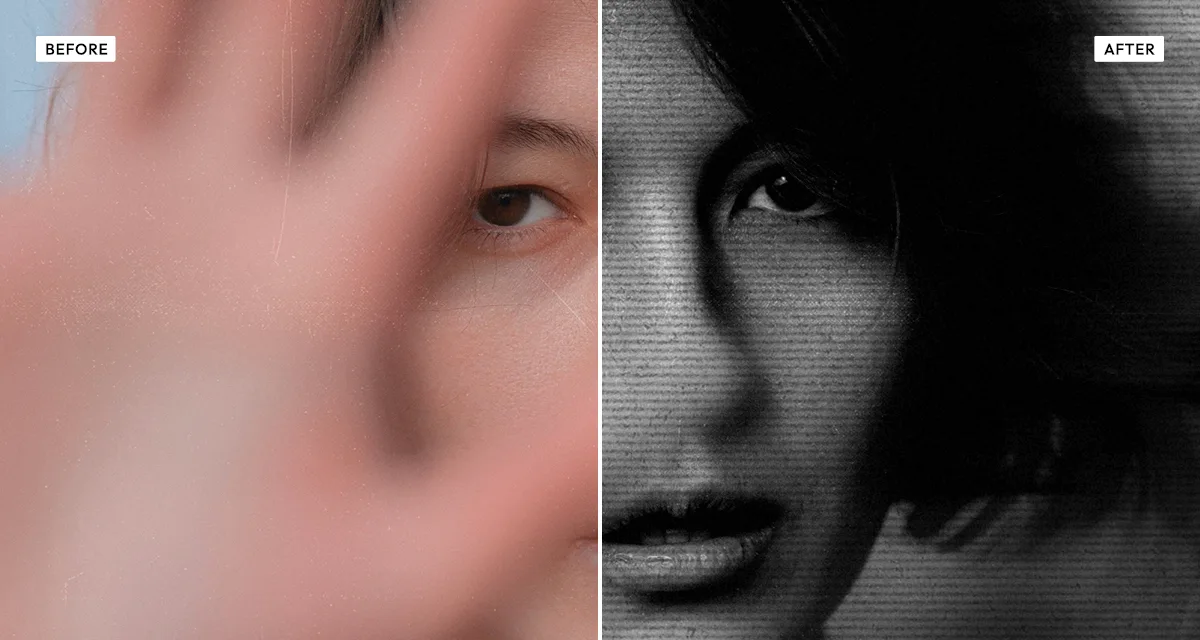
About the Photocopy Scan Effect
Last updated 21 August 2026
How the effect works
Xerography works by charging a drum, exposing it to the image so the charge drains where light falls, then dusting it with toner that sticks only to the charged areas. It is a threshold process, not a tonal one: a pixel is either dark enough to hold toner or it is not. Midtones survive only as coarse dithering, which is why a photocopied photograph loses almost everything between black and white on the first pass, and why the losses compound with each generation.
Artists used that deliberately from the 1960s onward. Copy art and, later, the whole zine and punk-flyer aesthetic depended on the machine being bad at its job — high contrast, blown highlights, toner streaks and the smeared drag that happens when paper slips against the drum.
The controls here map to specific machine faults. Streak is uneven toner distribution, scanner drag is the smear from paper slipping, scanlines are the horizontal banding of the imaging bar, and edge raises the harsh dark outline a copier leaves where contrast changes sharply.
What each control does
| Control | Range | Default | What it changes |
|---|---|---|---|
| Contrast | 0–200 | 50 | Xerography is a threshold process, so contrast is the core control here. |
| Brightness | −100 to +100 | 6 | Shifts where the threshold between toner and bare paper falls. |
| Black point | 0–60 | 18 | Where shadows clip to solid toner. |
| Streak | 0–100 | 55 | Uneven toner distribution down the page. The most recognisable copier fault. |
| Scanner drag size | 0–100 | 20 | Smearing where the paper slips against the drum. |
| Scanner drag softness | 1–100 | 50 | How soft that smear is. Low is a hard band, high is a gradual pull. |
| Scanlines | 0–100 | 45 | Horizontal banding from the imaging bar. |
| Grain | 0–100 | 28 | Toner speckle and paper noise. |
| Edge | 0–100 | 48 | The harsh dark outline a copier leaves where contrast changes sharply. |
Tips
- Push contrast harder than feels comfortable. A photocopier destroys midtones, and a gentle setting just looks like a grey photo.
- Use streak and scanner drag together but keep both moderate. One obvious fault reads as authentic; every fault at once reads as a filter.
- High-contrast subjects survive best — bold type, silhouettes, strong graphic shapes. Subtle portraits disappear.
- For a multi-generation look, raise edge above 60. That harsh outline is what accumulates when something is copied from a copy.
Common uses
Zines and flyers, punk and DIY poster design, collage and cut-up artwork, band merchandise, album sleeves, prop documents, and any design that should look reproduced rather than printed properly.
Frequently asked questions
What is the photocopy scan effect?
The photocopy scan effect makes a photograph look like it has been through an office copier repeatedly. It crushes the tonal range to near black-and-white, then adds toner streaks, scanner drag, scanline banding and harsh edge outlines — the specific faults that make photocopied images recognisable.
How do I make a photo look photocopied?
Push contrast hard, then add toner streaks and edge darkening. A copier is a threshold device rather than a tonal one — toner either sticks or it does not — so midtones barely survive the first pass. A gentle setting just looks like a grey photo; the destruction is the effect.
How do I get a punk or DIY flyer look?
Keep the subject graphic — bold shapes and type rather than a subtle portrait — then raise streak to around 60 and edge above 50. The zine and punk-flyer aesthetic came from the machine failing, so the faults are the style. For cut-and-paste montage on top, use Coolage.
Is the photocopy scan effect free to use?
Yes. The photocopy scan effect is free, and you can adjust every setting and preview the result without signing up. Credits are only needed to download at full original resolution; the preview and standard-resolution download cost nothing.
Do I need to upload my photo?
No. The photocopy scan effect runs entirely in your browser, so your original photo is processed on your own device and never leaves it. If you are signed in and save a full-resolution download, the rendered result — not your original — is stored in your private account folder, encrypted with AES-256, and deleted automatically after 30 days.
Why do photocopied photos lose so much detail?
Xerography is a threshold process rather than a tonal one. Toner sticks where the drum holds a charge and does not where it has drained, so each point is essentially either black or white. Midtones survive only as coarse dithering, and the losses compound every time a copy is copied.
How do I make a photo look like a punk zine?
Push contrast high, raise streak to around 60 and edge above 50, and keep the subject graphic — bold shapes and type rather than subtle portraits. The zine look comes from the copier failing, so the faults are the aesthetic. For cut-and-paste montage on top of it, try Coolage.
Can I use the photocopy scan effect on client or commercial work?
Yes. Images you create with the photocopy scan effect can be used for personal and commercial projects, including client work, packaging and merchandise. Full terms are on the licence page.
Related effects
For cut-and-paste montage, see Coolage. Old Newspaper prints onto aged newsprint, Risograin Flattener gives a single flat ink wash, and Texturizer adds physical scratches and creases.