Drop an image hereor click to chooseJPG, PNG, WebP
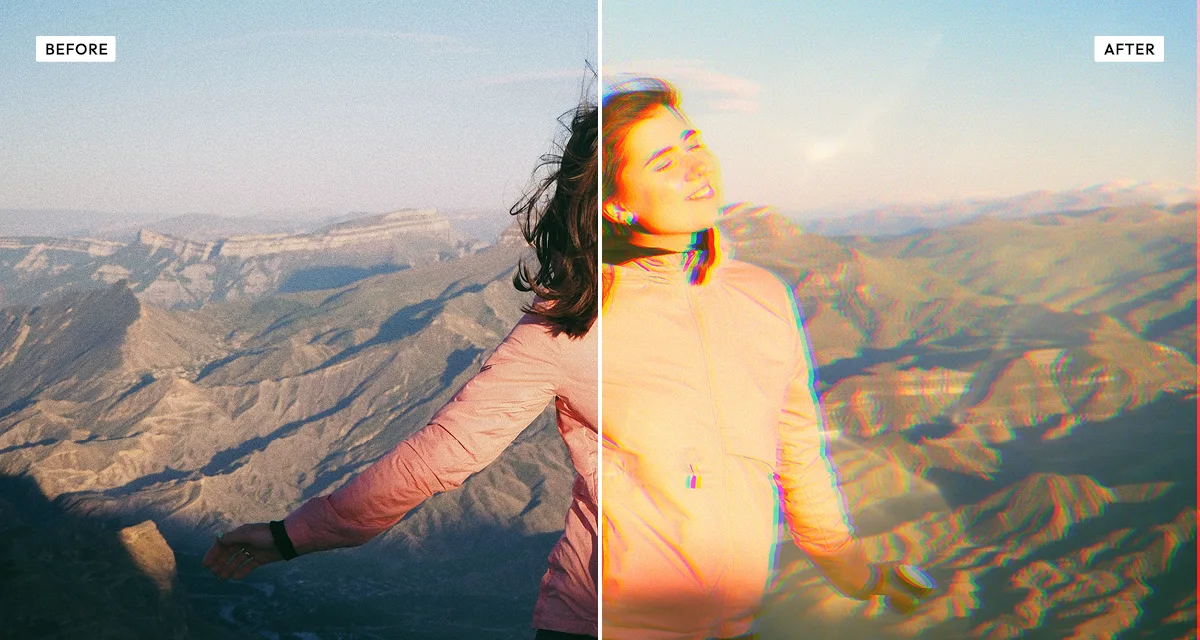
About the Prismatic Light Effect
Last updated 21 August 2026
How the effect works
A camera lens is several pieces of glass, and glass refracts different wavelengths by different amounts. When a strong light source is just outside the frame, some of that light bounces between the elements instead of reaching the sensor cleanly, and what comes back is the flare: streaks, rings and a warm haze that were never in the scene.
Chromatic aberration is the same physics at a smaller scale. Because red, green and blue focus at slightly different distances, high-contrast edges pick up coloured fringing — a red edge on one side, cyan on the other. Lens makers spend enormous effort eliminating it, and photographers spend effort adding it back, because a perfectly corrected image reads as computer-generated.
Here the two are separate controls. The light overlay is a real photographed flare you can scale and rotate to place it where the light should be coming from, while shift and angle drive the channel separation independently. Keeping them apart matters, because a flare with no aberration looks pasted on and aberration with no flare looks like a fault.
What each control does
| Control | Range | Default | What it changes |
|---|---|---|---|
| Overlay intensity | 0–100 | 75 | Strength of the photographed light flare laid over the image. |
| Overlay scale | 80–180% | 100 | Size of the flare. Larger spreads it across more of the frame. |
| Overlay rotation | 0–360° | 0 | Where the light appears to come from. Match it to the real light in the photo. |
| Blend mode | several | screen | How the flare combines with the image. Screen keeps only its bright parts. |
| Chromatic shift | 0–100 | 20 | How far the red and blue channels separate. Small amounts read as a lens, large as a glitch. |
| Shift angle | 0–360° | 0 | Direction of the channel separation. |
| Brightness | −100 to +100 | 0 | Overall exposure. |
| Saturation | −100 to +100 | 10 | Colour intensity, raised slightly since flare tends to wash colour out. |
| Warmth | −100 to +100 | 20 | Colour temperature. Positive suits sunlight flare; negative suits artificial light. |
| Grain | 0–100 | 8 | A small amount stops the overlay looking digitally clean. |
Tips
- Rotate the overlay to match the light already in the photograph. A flare coming from the opposite side to the shadows is the fastest way to make it look fake.
- Keep chromatic shift under about 30 for a believable lens. Above that it reads as a deliberate glitch effect, which is a different look.
- Use both controls together. Flare without aberration looks pasted on; aberration without flare looks like a lens fault.
- Backlit photographs and night scenes with point lights take this best. Flat, evenly lit images have no light source for the flare to belong to.
Common uses
Music and event artwork, film and game poster art, backlit portraits, product shots that need atmosphere, website hero images, social posts, and any photograph that should feel shot into the light.
Frequently asked questions
What is the prismatic light effect?
The prismatic light effect adds lens flare and chromatic aberration to a photograph. It layers a real photographed light overlay across the frame and separates the red and blue colour channels at edges, reproducing what happens optically when strong light strikes a lens at an angle.
How do I add a lens flare to a photo?
Place a light overlay and rotate it to match the light already in the picture. A flare coming from the opposite side to the existing shadows is the fastest way to look fake. Add a small amount of chromatic aberration alongside it — under 30 — because flare without fringing reads as pasted on.
How do I add a rainbow or prism effect to a photo?
Raise the chromatic shift, which separates the red and blue channels so high-contrast edges pick up coloured fringing. Small amounts read as a real lens; above about 30 it reads as a deliberate glitch, which is a different look. Backlit photographs and night scenes with point lights take it best.
Is the prismatic light effect free to use?
Yes. The prismatic light effect is free, and you can adjust every setting and preview the result without signing up. Credits are only needed to download at full original resolution; the preview and standard-resolution download cost nothing.
Do I need to upload my photo?
No. The prismatic light effect runs entirely in your browser, so your original photo is processed on your own device and never leaves it. If you are signed in and save a full-resolution download, the rendered result — not your original — is stored in your private account folder, encrypted with AES-256, and deleted automatically after 30 days.
What is chromatic aberration?
Chromatic aberration is coloured fringing at high-contrast edges, caused by a lens focusing red, green and blue light at slightly different distances. It shows as a red edge on one side of a boundary and cyan on the other. Lens designers work hard to remove it; photographers often add it back because a perfectly corrected image reads as computer-generated.
How do I make a lens flare look realistic?
Match the flare to the light already in the photograph. Rotate the overlay so it comes from the same direction as the existing highlights and shadows, and add a small amount of chromatic aberration — under 30 — alongside it. Flare from the wrong direction, or flare with no aberration at all, is what makes the effect look pasted on.
Can I use the prismatic light effect on client or commercial work?
Yes. Images you create with the prismatic light effect can be used for personal and commercial projects, including client work, packaging and merchandise. Full terms are on the licence page.
Related effects
For glass distortion rather than flare, see Reeded Glass. Motion Blur adds directional movement, Day to Night turns the scene nocturnal, and Mesh Gradients generates coloured light from nothing.