Drop an image hereor click to chooseJPG, PNG, WebP
About the Vintage Effect
Last updated 21 August 2026
How the effect works
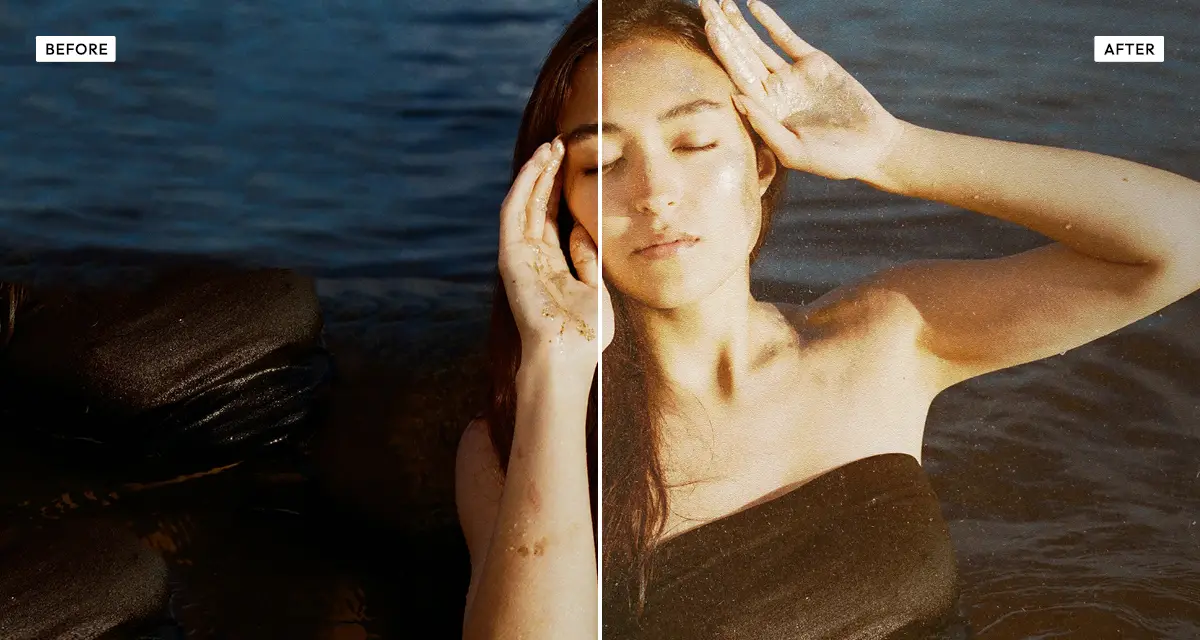
A photograph ages in two ways at once. The dyes shift and fade, and the physical object accumulates damage: paper fibre becomes visible, emulsion picks up scratches, chemicals stain, dust settles into the surface. Colour grading alone can imitate the first and never the second, which is why most "vintage" filters look modern.
The Vintage effect handles both. Tone controls fade and warm the image, and five separately scanned texture layers are composited over the top — each with its own blend mode and its own slider, so you control how much paper, noise and each of the three scratch passes shows through. Because the textures are photographed rather than generated, they carry the irregularity real damage has and procedural noise does not.
What each control does
| Control | Range | Default | What it changes |
|---|---|---|---|
| Warmth | −100 to +100 | 35 | Amber cast of aged dyes. Negative values push cool, for a colder archival look. |
| Fade | 0–100 | 30 | Lifts the black point so the image loses its deepest shadows, as old prints do. |
| Saturation | −100 to +100 | −15 | Colour intensity. Old prints lose saturation unevenly, so slightly negative reads true. |
| Contrast | −100 to +100 | −5 | Overall contrast. Aged prints are flatter than modern photographs. |
| Vignette | 0–100 | 30 | Edge darkening from the original lens and from light damage at the print edges. |
| Noise texture | 0–100 | 100 | Scanned film grain. On full by default because it binds the other layers together. |
| Paper | 0–100 | 40 | Paper fibre showing through the emulsion. Raise it for a matte, printed-on-paper feel. |
| Scratches | 0–100 | 60 | The main scratch and scuff pass. The most visible damage layer. |
| Scratches A | 0–100 | 8 | A second, finer scratch pass. Small amounts add irregularity without obvious repetition. |
| Scratches B | 0–100 | 20 | Cream-coloured stain patches, blended as soft light for subtle chemical aging. |
Tips
- Leave noise texture high. It sits underneath the other layers and stops them looking pasted on.
- Use Scratches A and B sparingly — under 25 each. Their job is irregularity, not damage.
- For a 1950s look, push warmth and paper up and keep scratches low. For a damaged, found-photograph look, invert that.
- Raise fade before reaching for contrast. Old prints lose their blacks first.
Common uses
Album artwork, zines and posters, mood boards, historical and documentary layouts, wedding and family galleries, book covers, and any design that needs a photograph to feel found rather than shot.
Frequently asked questions
What is the Vintage photo effect?
The Vintage photo effect ages an image by combining tonal fading with five scanned analog textures: paper fibre, film noise and three separate scratch and stain layers. The result reproduces both the colour shift and the physical wear that a real aged print carries.
How do I add scratches and dust to a photo?
Layer them from the texture controls. This effect carries five separately scanned surfaces — paper fibre, film noise and three kinds of scratch and stain — each on its own slider, so you decide how much of each shows. Because they are photographic scans rather than generated noise, they carry the irregularity real damage has.
How do I make a photo look damaged or worn?
Combine tonal fading with physical texture — fading alone reads as a colour filter, damage alone as an overlay pasted on top. The full method is explained here, and the old and vintage effects page compares which kind of wear each effect produces.
Is the Vintage effect free to use?
Yes. The Vintage effect is free, and you can adjust every setting and preview the result without signing up. Credits are only needed to download at full original resolution; the preview and standard-resolution download cost nothing.
Do I need to upload my photo?
No. The Vintage effect runs entirely in your browser, so your original photo is processed on your own device and never leaves it. If you are signed in and save a full-resolution download, the rendered result — not your original — is stored in your private account folder, encrypted with AES-256, and deleted automatically after 30 days.
Are the vintage textures real or generated?
They are real. All five textures are photographic scans of actual paper, film grain and damaged emulsion, not procedurally generated noise. That matters because real damage is irregular in a way algorithms tend not to reproduce, and the eye notices the difference immediately at large sizes.
What is the difference between the Vintage and Polaroid effects?
The Vintage effect adds physical wear — paper, scratches, stains and dust — on top of faded tones. The Polaroid effect reproduces instant-film chemistry instead: a warm cast, lifted blacks and low contrast, with no damage layers. Use Vintage for an old object, Polaroid for old film.
Can I use the Vintage effect on client or commercial work?
Yes. Images you create with the Vintage effect can be used for personal and commercial projects, including client work, packaging and merchandise. Full terms are on the licence page.
Related effects
For instant-film colour without the damage, try Polaroid. Retro Analog Film simulates 35mm stock, Texturizer gives you eleven grunge textures with full control, and Old Newspaper takes aging all the way to printed newsprint.