Drop an image hereor click to chooseJPG, PNG, WebP
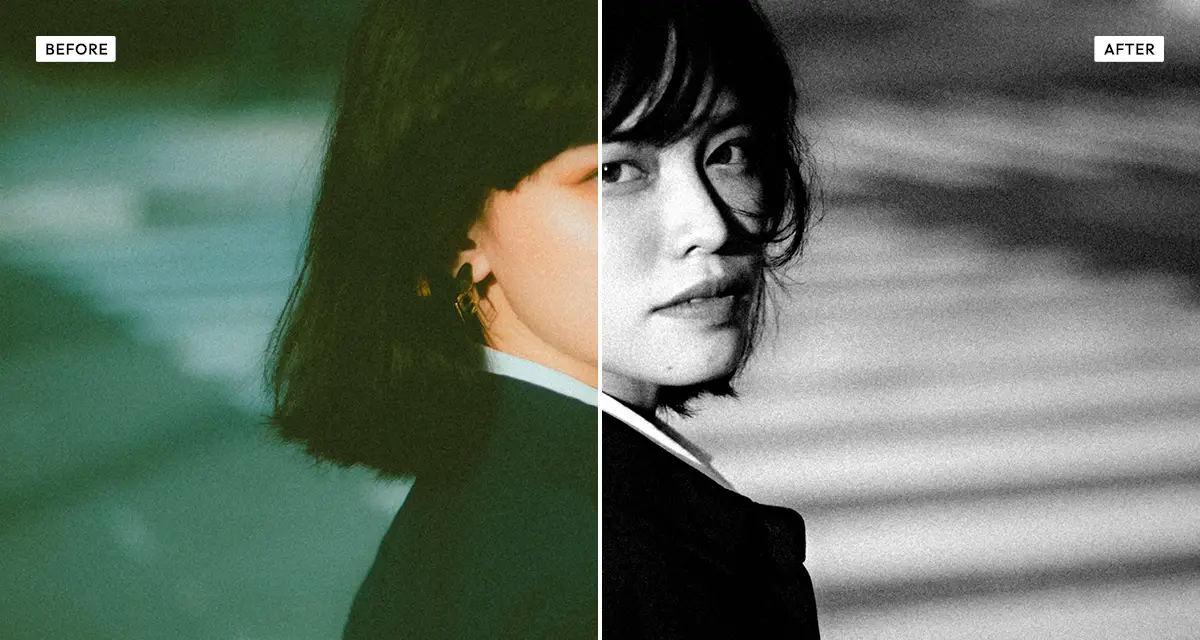
About the Dramatic Black and White Effect
Last updated 21 August 2026
How the effect works
Turning colour into grey is a choice, not a calculation. A red apple and a green leaf can be identical shades of grey, or one can be black and the other white, depending entirely on how much each colour channel contributes. Film photographers controlled this with physical filters — a red filter over the lens darkens blue sky dramatically, which is how those near-black skies in classic landscape photography were made.
The channel mixer does the same thing digitally. Raising red lightens skin and lips and darkens foliage; raising blue lightens sky and darkens skin, which usually looks harsh on portraits. The defaults here — 30 red, 50 green, 20 blue — approximate how the eye perceives brightness. Tone and texture controls then shape the result, with clarity adding local contrast at edges rather than globally.
What each control does
| Control | Range | Default | What it changes |
|---|---|---|---|
| Red mix | 0–100 | 30 | Red contribution to grey. Raise to lighten skin and lips, darken foliage and red objects. |
| Green mix | 0–100 | 50 | Green contribution. The largest share by default, because the eye is most sensitive to green. |
| Blue mix | 0–100 | 20 | Blue contribution. Raise to lighten sky; usually unflattering on skin. |
| Contrast | −100 to +200 | 60 | Global contrast. The range runs to 200 because dramatic monochrome needs it. |
| Blacks | −100 to +100 | −25 | Black point. Negative crushes shadows for a heavier, more graphic image. |
| Highlights | −100 to +100 | 15 | Highlight recovery or push. Positive brightens the top end. |
| Clarity | 0–100 | 30 | Local contrast at edges. Adds punch and texture without flattening the whole image. |
| Grain | 0–100 | 15 | Film grain, which reads as authentic on monochrome more than on colour. |
| Vignette | 0–100 | 25 | Edge darkening to hold the eye in the frame. |
Tips
- For skies, lower blue and raise red. This is the digital equivalent of a red lens filter and the fastest route to a dramatic sky.
- For portraits do the opposite: raise red, keep blue low. Blue-heavy mixes make skin blotchy.
- The three mix values do not have to total 100, but keeping them near it preserves overall brightness.
- Use clarity rather than contrast when only the texture needs emphasis — architecture and portraits especially.
Common uses
Portrait and street photography, architecture, landscape, editorial and press layouts, band photography, exhibition prints, and any image where colour distracts from form, gesture or texture.
Frequently asked questions
What is the Dramatic Black and White effect?
The Dramatic Black and White effect converts colour photos to monochrome using a channel mixer, so you decide how much red, green and blue each become grey. That control is what allows a sky to go near-black or skin to stay bright, rather than accepting a single fixed conversion.
How do I convert a photo to black and white properly?
Use the channel mixer rather than accepting a single fixed conversion. Two different colours can otherwise render as the same grey, flattening the image. Deciding how much red, green and blue each contribute is the digital equivalent of screwing a coloured filter onto a film camera.
How do I make skin look good in black and white?
Raise the red mix and keep blue low — skin contains far more red, so a red-heavy mix renders it bright and smooth while a blue-heavy one exaggerates blemishes. How the other effects on this site treat skin is compared on the portrait photo effects page.
Is the Dramatic Black and White effect free to use?
Yes. The Dramatic Black and White effect is free, and you can adjust every setting and preview the result without signing up. Credits are only needed to download at full original resolution; the preview and standard-resolution download cost nothing.
Do I need to upload my photo?
No. The Dramatic Black and White effect runs entirely in your browser, so your original photo is processed on your own device and never leaves it. If you are signed in and save a full-resolution download, the rendered result — not your original — is stored in your private account folder, encrypted with AES-256, and deleted automatically after 30 days.
What is a channel mixer and why does it matter?
A channel mixer sets how much of each colour channel contributes to the final grey value. It matters because two different colours can otherwise convert to the same shade, flattening the image. Adjusting the mix is the digital equivalent of screwing a coloured filter onto a film camera.
How do I get a dark dramatic sky in black and white?
Lower the blue mix and raise the red mix. Blue sky contains little red, so a red-heavy mix renders it dark while clouds, which are neutral, stay bright — producing the near-black skies of classic landscape photography. Then raise contrast and add a little clarity to separate the cloud edges.
Can I use the Dramatic Black and White effect on client or commercial work?
Yes. Images you create with the Dramatic Black and White effect can be used for personal and commercial projects, including client work, packaging and merchandise. Full terms are on the licence page.
Related effects
For desaturated colour rather than full monochrome, see Old Bleach. Grainy Film Poster pushes grain to poster levels, Engrave Halftone converts to etched line art, and Duotone maps the same tonal range onto two colours.